As an Amazon Associate, I can earn from qualifying purchases. Learn more.
Reolink and Arlo both make capable home security cameras, but they serve different priorities. Reolink offers battery, solar, Wi-Fi, PoE, cellular, Home Hub, and NVR options. Arlo focuses more on easy-to-install wireless cameras, cloud recording, and smart-home integration.
The key question is how you want to store recordings. Reolink is usually better for local storage and avoiding recurring fees. Arlo is more appealing if you want a polished cloud experience and will pay for its best features. For more choices, see our guide to the best battery-powered wireless security cameras.
Reolink vs Arlo: Quick Verdict
Choose Reolink for local recording, flexible hardware, better long-term value, and systems that may expand beyond a few wireless cameras.
Choose Arlo for a streamlined wireless setup, broader smart-home support, and cloud-based features in one app. It works without a plan at a basic level, but many valuable features require Arlo Secure.
| Feature | Reolink | Arlo | Winner |
|---|---|---|---|
| Battery-camera resolution | Up to 4K | Up to 4K | Tie |
| Local storage | microSD, Home Hub, or NVR, depending on model | Compatible SmartHub required on supported models | Reolink |
| Subscription | Usually unnecessary for local recording | Needed for cloud history and premium features | Reolink |
| Product range | Battery, Wi-Fi, PoE, cellular, dual-lens, and NVR | Wireless, doorbell, floodlight, and cellular | Reolink |
| Smart-home support | Alexa and Google on selected models | Alexa, Google Home, IFTTT, SmartThings, and some Apple Home setups | Arlo |
| Best for | Local control and value | Wireless convenience and cloud features | Depends |
Reolink Overview
Reolink has the broader ecosystem. A renter can start with a battery camera and solar panel, while a homeowner can build a wired PoE system with continuous NVR recording. Several current battery models offer 4K video, smart object detection, color night vision, and local microSD storage.
Compatible cameras can record to a microSD card, Reolink Home Hub, or NVR without a required monthly plan. Cloud availability varies by camera and region, so it is optional rather than the foundation of the system. Learn more in our Reolink security camera system review.
Arlo Overview
Arlo is known for wire-free cameras that are simple to position and manage. Its current ranges include Essential, Pro, and Ultra, plus video doorbells and floodlight cameras. Model-dependent features include 2K or 4K HDR, spotlights, color night vision, removable batteries, and dual-band Wi-Fi.
The app and cloud service are central to Arlo. Live viewing and basic motion notifications can work without a plan, but cloud video history and premium detection tools generally require Arlo Secure. Buyers comparing midrange models can also read Arlo Pro 5S vs Pro 4.

Reolink vs Arlo: Key Differences
Camera Selection and Expansion
Reolink makes stand-alone battery cameras, solar models, PoE cameras, 4G LTE cameras, doorbells, dual-lens cameras, hubs, and NVR kits. That range makes it easier to grow from one camera into a larger system.
Arlo has a narrower but more unified lineup. Many cameras connect directly to Wi-Fi, while compatible models can use a SmartHub. It is ideal for a coordinated wireless setup, but Reolink provides more options for large or specialized installations.
Video Quality and Night Vision
Both brands now offer battery cameras with up to 4K resolution, so describing Reolink as a 1080p-only brand is outdated. Actual quality also depends on the sensor, field of view, lighting, compression, signal strength, and placement.

Reolink offers wide dual-lens views and strong low-light features on models such as the Argus 4 Pro; see our Reolink Argus 4 Pro review. Arlo’s premium models combine HDR, wide views, spotlights, and color night vision. Compare individual cameras rather than assuming one brand always looks better.
Detection and Smart Alerts
Many current Reolink cameras identify people, vehicles, and animals on the device. These alerts can work without making a cloud plan the default, although available detection and tracking types vary by model.
Arlo provides basic motion alerts without a subscription. Its paid plans add saved cloud recordings and richer recognition or notification features. Arlo suits cloud-led monitoring; Reolink is stronger when local processing and low ongoing cost matter.
Storage and Subscription Costs
Storage is the biggest difference. Many Reolink cameras accept a microSD card, and compatible systems can use a Home Hub or NVR. Capacity varies, so check the exact model instead of relying on an old universal card limit.
Arlo can provide live view and motion notifications without a plan, but cloud history and many premium tools require Arlo Secure. Compatible SmartHubs support local recording for selected cameras, though Arlo remains more cloud-focused. Check current plan prices before calculating the two- or three-year cost.
Battery, Solar, and Continuous Recording
Battery life for either brand changes with motion frequency, recording length, temperature, Wi-Fi strength, and live viewing. Treat manufacturer estimates as ideal-condition guidance. A camera facing a busy road will usually need charging sooner than one watching a quiet yard.
Both companies sell solar accessories for compatible outdoor cameras. For reliable 24/7 recording, a powered Reolink PoE or Wi-Fi camera connected to an NVR is generally more suitable than a typical battery camera.
Installation and Smart Homes
Arlo has an edge for a simple wireless installation. Direct-to-Wi-Fi support on cameras such as the Pro 6 reduces extra hardware, while an optional SmartHub can add compatible local storage and networking features.
Reolink battery cameras are also easy to install, but its PoE and NVR options require more planning. Selected Reolink products support Alexa and Google Home. Arlo works with a broader mix of services, but compatibility for both brands depends on the exact camera and hub.
Two Current Models to Consider
Reolink Argus PT Ultra

- 4K 8MP Color Vision Day & Night: The battery security camera is upgraded to 4K 8MP ultra-high...
- 100% Wire-Free Easy Setup: The camera works on 2.4/5GHz WiFi and continuously powered by the new 3W...

The Reolink Argus PT Ultra is a 4K battery camera with pan-and-tilt coverage, automatic tracking, color night vision, and dual-band Wi-Fi 6. It supports local microSD recording and compatible Reolink hubs, while an optional solar panel can reduce manual charging.
Its rotating lens covers more ground than a fixed camera, although it cannot watch every direction simultaneously. Frequent tracking and recording also use more battery. It is a strong choice for flexible outdoor coverage without a required cloud subscription.
Pros
- 4K video and wide pan-and-tilt coverage
- Local recording without a required monthly plan
- Person, vehicle, and animal detection
- Dual-band Wi-Fi 6 and optional solar charging
Cons
- May miss activity outside its current viewing direction
- Storage card or hub may cost extra
- Heavy tracking reduces battery life
Arlo Pro Security Camera 2K, 6th Gen
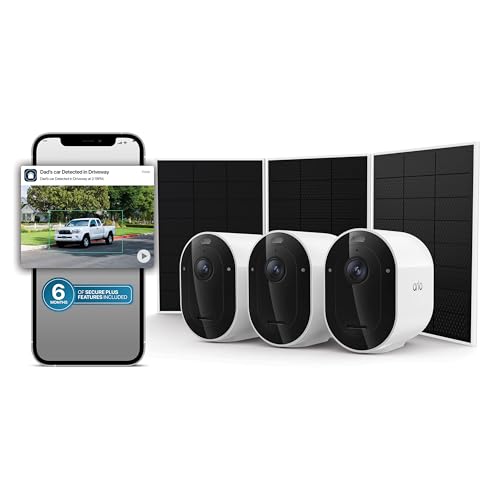
- Protection for Busy Families: A 2K HDR security camera with Smart Detections to reduce false alerts...
- Custom Alerts That are Important to You: Set unique detections like garage door opening, dog on...
The Arlo Pro 6th Gen offers 2K HDR, a 160-degree view, color night vision, a spotlight, a swappable battery, and 2.4GHz or 5GHz Wi-Fi. The linked product is a multi-camera solar bundle, so compare its contents—not just its price with other packages.
It is a good fit for buyers who want an easy wireless setup and cloud-centered app. Live view and motion alerts work without a subscription, while Arlo Secure adds cloud history and premium features. A compatible SmartHub is optional.
Pros
- Clear 2K HDR video with a broad view
- Dual-band Wi-Fi; no hub needed for basic setup
- Swappable battery, spotlight, and color night vision
- Broad smart-home support
Cons
- Best cloud features require a paid plan
- Local recording needs compatible extra hardware
- Bundle prices can make comparison confusing
Which Brand Should You Choose?
Buy Reolink if you want recordings kept at home, no required subscription, or room to expand into PoE and NVR equipment. Buy Arlo if a smooth wireless experience, cloud recording, and smart-home compatibility matter more than recurring cost.
Choose the storage method first, decide whether you will pay for cloud service, and then compare cameras with similar resolution, power, and coverage. This is more useful than comparing a single camera with a multi-camera bundle.
Frequently Asked Questions
Does Reolink require a subscription?
No. Compatible cameras record to microSD, Home Hub, or NVR without a monthly fee. Optional cloud support varies by model and region.
Can Arlo work without a subscription?
Yes. Live viewing and basic motion notifications can work without Arlo Secure. Cloud video history and many advanced tools need a paid plan.
Which is better for local storage?
Reolink. Local recording is central to its ecosystem, while Arlo requires a compatible SmartHub for supported local-storage setups.
Which has better video quality?
Both offer cameras up to 4K. The better image depends on the particular model, lighting, view, placement, and network not only the brand.
Which is better for smart homes?
Arlo generally supports more platforms. Reolink supports Alexa and Google Home on selected products. Verify the exact camera and hub before buying.
Final Verdict
For most value-conscious buyers, Reolink is the better overall choice. Its local storage, broad hardware range, and subscription-free operation make it easier to build a capable system without permanent cloud fees.
Arlo is the better cloud-first choice for straightforward wireless installation, a polished app, and wider smart-home integration. Its hardware is capable, but include Arlo Secure in the long-term budget.
If neither fits, compare Reolink vs Amcrest, Reolink vs Lorex, or Ring vs Nest vs Arlo. Owners of older equipment can also see Arlo Pro vs Arlo Pro 2 and Arlo Pro 2 vs Arlo Ultra.