As an Amazon Associate, I can earn from qualifying purchases. Learn more.
A dark driveway or backyard creates two problems: you cannot see what triggered an alert, and an intruder has more places to hide. The best floodlight security camera solves both by combining wide-area lighting with video surveillance, motion alerts, two-way audio, and an audible warning in one fixture.
However, brightness alone does not make a camera a good purchase. Video resolution, field of view, motion accuracy, recording options, app quality, and ongoing subscription costs matter just as much. Most full-size floodlight cameras are also hardwired, so the installation location needs an existing weatherproof electrical box or new wiring.
For this guide, we compared current manufacturer specifications, storage choices, smart-home support, and active Amazon listings. The seven models below serve different needs, from 360-degree tracking to subscription-free local recording.
Best Floodlight Security Cameras at a Glance
| Product | Best for | Video | Maximum light output | Coverage | Recording options |
|---|---|---|---|---|---|
| eufy Floodlight Camera E340 | Best overall | 3K wide + 2K telephoto | 2,000 lumens | Pan and tilt | microSD or HomeBase 3 |
| aosu FloodlightCam Pro L5P | 360° PTZ coverage | 3K | 2,600 lumens | 360° pan, 90° tilt; 270° PIR detection | microSD up to 128GB or optional cloud |
| Ring Floodlight Cam 4K Pro | Ring and Alexa homes | 4K | 2,000 lumens | 140° horizontal | Ring cloud plan |
| Wyze Cam Floodlight Pro | Bright value | 2.5K | 3,000 lumens | 180° diagonal | microSD or Wyze cloud plan |
| Tapo C720 | Budget local storage | 2K QHD | 2,800 lumens | 153° diagonal; 270° PIR detection | microSD or Tapo Care |
| Google Nest Cam with Floodlight | Google Home | 1080p HDR | 2,400 lumens | 130° camera; 180° light detection | Google cloud history |
Floodlight Camera vs. Spotlight Camera
A floodlight camera is designed to illuminate a driveway, yard, or other broad area. It normally has two or three adjustable light panels and often produces 2,000 to 3,000 lumens. A spotlight camera uses a smaller light for a tighter zone such as a porch, gate, or side passage. Spotlight models also offer more battery and plug-in choices.

Choose a floodlight camera when you are replacing an outdoor light and want continuous wired power. Choose a spotlight model when easier placement or a smaller fixture matters more than maximum brightness. Our guide to the best spotlight security cameras covers the second category in detail.
1. Best Overall: eufy Floodlight Camera E340

- 【Dual 2K/3K Cameras with 8X Hybrid Zoom】The 3K ultra-clear wide-angle lens provides a broad...
- 【360° Coverage with Auto-Tracking】Enjoy a comprehensive 360° field of view through the...
The eufy Floodlight Camera E340 earns our best-overall position because it balances useful detail, broad coverage, and local recording. Its dual-camera system pairs a 3K wide-angle lens with a 2K telephoto lens, providing up to 8× hybrid zoom. The motorized camera pans through 355 degrees and tilts 120 degrees, while AI can recognize and follow people, vehicles, and pets. That arrangement is particularly useful in a driveway where a fixed lens may lose a subject after the person moves beneath or beside the camera.
Two adjustable panels provide up to 2,000 lumens of light. The E340 supports dual-band Wi-Fi 6 and can record continuously to a microSD card of up to 128GB. It also works with HomeBase 3 for expandable centralized storage, but a HomeBase is not required for basic operation. The tradeoff is that the fixture costs more than basic fixed cameras, and its best resolution drops during continuous recording.
Pros:
- Dual lenses provide wide coverage and a closer telephoto view
- Automatic pan, tilt, and subject tracking
- Local recording without a required monthly fee
- 2.4GHz and 5GHz Wi-Fi 6 support
- IP65 weather-resistant construction
Cons:
- Only 2,000 lumens, below the brightest models in this guide
- microSD card and HomeBase 3 are sold separately
- Requires hardwired AC installation
2. Best for 360° Coverage: aosu FloodlightCam Pro
No products found.
The aosu FloodlightCam Pro L5P is a practical choice for monitoring a wide driveway, backyard, or front entrance with one fixture. It records in 3K resolution and provides up to 6× digital zoom for examining distant details. Its motorized head pans through 360 degrees and tilts 90 degrees, while three PIR sensors monitor a 270-degree detection area. When a person, vehicle, or pet enters the area, the camera can turn toward the activity and track the subject automatically.
Its motion-activated floodlights produce up to 2,600 lumens and spread light across a 270-degree area, with an advertised illumination distance of about 33 feet. The hardwired camera supports continuous 24/7 recording to a microSD card from 8GB to 128GB, so a monthly subscription is not required; optional cloud storage is also available. Other useful features include color night vision, scheduled patrols, a built-in alarm, two-way audio, and Alexa and Google Assistant compatibility. However, it connects only to 2.4GHz Wi-Fi and requires an existing junction box or professional wiring.
Pros:
- Detailed 3K video with up to 6× digital zoom
- 360-degree pan, 90-degree tilt, and automatic tracking
- Three PIR sensors provide 270-degree motion detection
- Bright 2,600-lumen floodlights with color night vision
- Continuous local recording without a required subscription
- Detects people, vehicles, and pets
- Works with Alexa and Google Assistant
Cons:
- Supports only 2.4GHz Wi-Fi
- microSD card is sold separately
- Local storage is limited to 128GB
- Requires hardwired AC installation
3. Best for Ring and Alexa: Ring Floodlight Cam 4K Pro
- Capture it all with Retinal 4K video — See every detail of your home or business in full view...
- See, hear and speak to visitors on camera — With Live View & Two-Way Talk with Audio+, you’ll be...

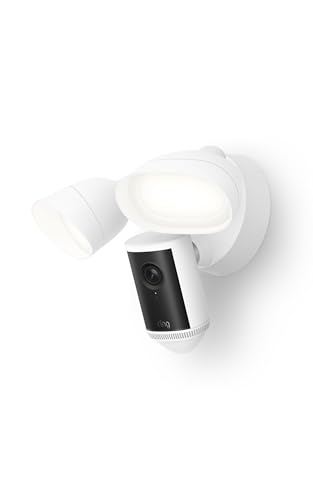
The latest Ring Floodlight Cam 4K Pro is an easy fit for homes already using Ring doorbells, alarms, or Alexa displays. It records at 3840 × 2160 and offers up to 10× Enhanced Zoom. Its 140-degree horizontal field of view covers a typical driveway without motorized movement. Radar-based 3D Motion Detection measures direction and distance, helping you focus alerts on your property instead of every car passing on the street.
The two adjustable lights deliver up to 2,000 lumens, and the camera includes Low-Light Sight, two-way talk with noise cancellation, privacy zones, and an 85dB remote siren. Live view, instant notifications, and two-way communication work without a paid plan. However, Ring requires a compatible subscription if you want to review, save, or share missed recordings. There is no microSD slot, so this is not the right pick for buyers who prioritize local storage.
Pros:
- Detailed 4K video and up to 10× zoom
- Accurate radar-based motion zones
- Smooth integration with Ring and Alexa devices
- Dual-band Wi-Fi 6 connectivity
- Adjustable 2,000-lumen lights
Cons:
- A paid Ring plan is needed for recorded-video history
- No local microSD storage
- Requires strong upload speed for consistent 4K streaming
4. Best Bright Value: Wyze Cam Floodlight Pro
- 180° Panoramic Camera View: Get complete property coverage with a leading 180° field-of-view. See...
- 2.5K HD Resolution with Color Night Vision: Capture and stream video in stunning 2.5K HD clarity...
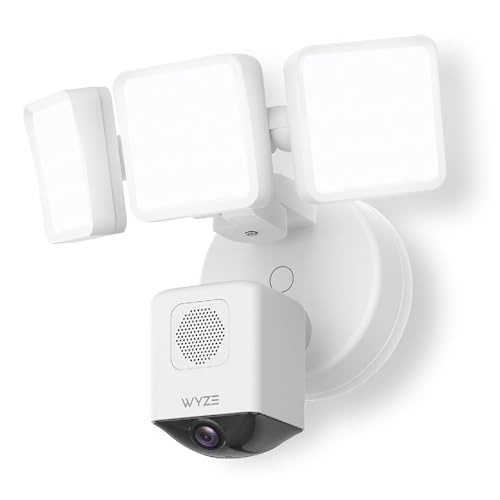
Wyze combines a very wide image with some of the brightest lighting in this price range. The Floodlight Pro records 2.5K video and has a 180-degree diagonal field of view, which works well above a two-car garage. Three individually adjustable LED panels produce a combined 3,000 lumens. A starlight sensor, color night vision, infrared LEDs, two-way audio, and a loud 105dB siren round out its nighttime features.
The camera connects to either 2.4GHz or 5GHz Wi-Fi and supports continuous local recording to a microSD card up to 256GB. Basic person and vehicle detection is available on the device, while some cloud history, faster notifications, and advanced response features sit behind a Wyze plan. Its fixed view cannot follow a subject, but it captures a broad scene without the moving parts or higher price of a PTZ model.
Pros:
- Three panels provide 3,000 lumens
- Wide 180-degree diagonal view
- 2.5K video with color night vision
- Up to 256GB microSD storage and 24/7 recording
- Dual-band Wi-Fi and IP65 weather resistance
Cons:
- Some enhanced alert features require a subscription
- Fixed camera cannot track motion around corners
- Large tri-light design may look bulky on a small porch
5. Best Budget Pick: TP-Link Tapo C720
- 【2800 Lumens Ultra-Bright Floodlight】Never miss a thing, even after dark. Tapo C720's powerful...
- 【2K QHD Live View】No blind spots, only sharp details. See every inch of your home with the wide...
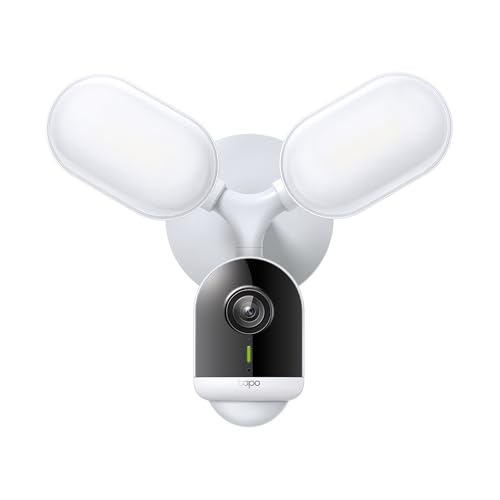
The Tapo C720 delivers the features most buyers need without making a cloud plan essential. It records 2K QHD video, covers 153 degrees diagonally, and uses three PIR sensors to detect motion across a wider 270-degree zone. Its two adjustable floodlights reach 2,800 lumens, while person, vehicle, pet, line-crossing, and tamper detection help separate useful alerts from routine movement.
A microSD slot supports cards up to 512GB for local 24/7 recording, and optional Tapo Care is available for cloud storage. The camera also supports RTSP and ONVIF, which makes it more flexible for compatible third-party viewing or recording systems. Its main compromises are 2.4GHz-only Wi-Fi and a 15fps maximum frame rate. Even so, it is a practical choice for a garage or side yard where value and local storage matter most.
Pros:
- Strong 2,800-lumen output
- Free person, vehicle, and pet detection
- microSD storage up to 512GB
- RTSP and ONVIF support
- Works with Alexa and Google Assistant
Cons:
- Does not support 5GHz Wi-Fi
- Video is limited to 15fps
- microSD card is sold separately
6. Best for Google Home: Google Nest Cam with Floodlight
- Nest Cam with floodlight has built-in intelligence and can tell the difference between a person...
- Easily check in from anywhere 24/7 with 1080p HDR video[1] with night vision; see what you missed...
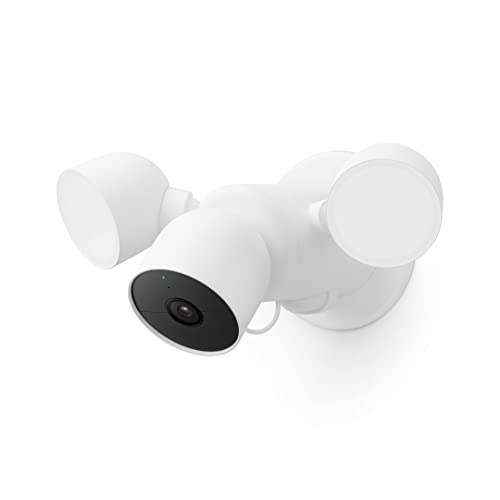
The Nest Cam with Floodlight is the most natural choice if the Google Home app already manages your cameras, speakers, and automations. The camera records 1080p HDR video at up to 30fps with a 130-degree diagonal view. On-device intelligence can distinguish people, vehicles, and animals, and the two motion sensors give the lights a 180-degree detection area. You also get two-way audio, activity zones, and 24/7 live viewing.
Its two adjustable 4000K lights produce up to 2,400 lumens. Google includes three hours of event video history, but that means events remain available only for a rolling three-hour window. A Google Home Premium plan is needed for longer event history or continuous recording. Video resolution also trails the 2K and 4K alternatives, and there is no microSD slot. Its appeal is the polished Google Home experience rather than the best specification sheet.
Pros:
- Deep integration with the Google Home app
- Useful on-device person, vehicle, and animal alerts
- 1080p HDR video with a smooth 30fps frame rate
- Three hours of event history included
- Dual-band Wi-Fi and Alexa compatibility
Cons:
- Lower resolution than most current rivals
- No removable local storage
- Subscription required for longer history or 24/7 recording
- IP54 rating offers less dust protection than IP65 models
How to Choose the Best Floodlight Security Camera
Match Brightness to the Area
About 2,000 lumens can cover a porch, parking pad, or compact backyard. A wide two-car driveway or open yard benefits from 2,800 to 3,000 lumens. More light is not always better: an overly bright fixture can disturb neighbors, wash out nearby faces, or reflect from white walls. Dimming controls and adjustable panels are therefore more useful than a high lumen number alone. If you only need illumination without video, compare our outdoor security light recommendations.
Check the Camera’s Coverage, Not Just the Lights
Light panels and the camera do not always cover the same angle. A 180-degree fixed camera shows the full scene at once, whereas a PTZ model can turn and follow movement beyond a normal lens. Fixed cameras are predictable; moving cameras are more flexible. Review the horizontal and vertical field of view and follow our outdoor camera placement guide before drilling or wiring.
Decide How You Want to Store Video
microSD, NVR, or hub storage usually avoids a recurring fee and keeps recordings under your control. Cloud storage can protect clips if the camera is damaged or stolen and is often easier to access remotely. Some cameras provide alerts and live view for free but require a plan to review missed events. Calculate at least two or three years of subscription cost before comparing prices. Our roundup of security cameras without subscriptions includes more local-storage choices.
Confirm Power and Wi-Fi Requirements
Every model in this guide needs continuous electrical power. Most replace an existing outdoor floodlight on a junction box; a few offer an optional plug-in cable. Turn off the circuit at the breaker before installation, confirm the power is off with an appropriate tester, and follow the manufacturer’s wiring instructions. Hire a licensed electrician if the box, grounding, weather sealing, or local electrical requirements are uncertain.
Wi-Fi also needs to be reliable at the installation point. A 2.4GHz connection reaches farther, while 5GHz may provide faster data transfer at shorter range. Check the signal outside before mounting a 4K camera, especially if brick, metal siding, or a detached garage sits between the fixture and router.
Frequently Asked Questions
Are floodlight security cameras worth it?
Yes, when you need both broad outdoor lighting and video coverage in the same location. They can illuminate a driveway, improve color footage after dark, and visibly discourage trespassing. They are less suitable for renters or places without a safe electrical connection.
How many lumens should a floodlight camera have?
For most homes, 2,000 to 3,000 lumens is a useful range. Compact entrances may need less, while a wide driveway benefits from the upper end. Adjustable brightness and correctly aimed panels help prevent glare and light spill.
Can a floodlight camera record without a subscription?
Some can. eufy, aosu, Wyze, and Tapo models in this guide support local storage, although the memory card or recorder is usually sold separately. Ring requires a plan to review missed recordings, while Nest includes only a short rolling event history before a subscription becomes necessary.
Can I install a floodlight camera myself?
You may be able to replace an existing compatible fixture if you understand household wiring and local requirements. The circuit must be switched off and verified before work begins. New wiring, damaged boxes, missing grounding, or uncertainty about weatherproofing should be handled by a licensed electrician.
Final Verdict
The eufy Floodlight Camera E340 is our overall best floodlight security camera because it combines dual lenses, automatic tracking, local storage, and dual-band Wi-Fi without requiring a monthly subscription. For wider motorized coverage at a more affordable price, the aosu FloodlightCam Pro is an excellent alternative with 360-degree pan, 3K video, 2,600-lumen lighting, and continuous local recording.
The other four cameras suit more specific needs. Choose the Ring Floodlight Cam 4K Pro for detailed 4K video and seamless Alexa integration, or the Wyze Cam Floodlight Pro for powerful 3,000-lumen lighting at a competitive price. The Tapo C720 is the best budget option for subscription-free local storage, while the Google Nest Cam with Floodlight is the most convenient choice for homes already using Google Home. Before selecting one, compare its video quality, lighting coverage, storage costs, Wi-Fi requirements, and compatibility with your existing smart-home system.